Introduction: what is a Hebrew transliterator and why a free online tool matters
A Hebrew transliterator is a digital system that converts text written in the Hebrew script into an equivalent representation in the Latin alphabet. Unlike a translator, which aims to render meaning in another language, a transliterator focuses on the form of the words—the way they look and sound—by mapping Hebrew letters and vowel points to Latin characters. A free online Hebrew transliterator offers immediate access from any internet-connected device, with no installation required, and typically supports multiple transliteration schemes so users can choose the standard that best fits their needs.
This article presents a thorough look at the capabilities, concepts, and practical uses of a dedicated online Hebrew transliteration tool. Whether you are a student compiling a linguistics project, a genealogist tracing family names, a biblicist preparing study notes, or a publisher preparing a bilingual edition, a robust free online transliterator can save time while improving consistency across documents.
Understanding transliteration, transcription, and Hebrew orthography
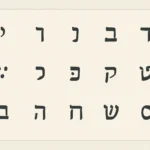
Before diving into the features of a Hebrew transliterator online, it helps to distinguish two related ideas: transliteration and transcription. Transliteration is the process of representing letters from one writing system in another writing system. In Hebrew, transliteration preserves the identity of Hebrew letters—shin, lamed, vav, mem, etc.—as Latin characters. Transcription, on the other hand, focuses on pronouncing the sounds of a word, often using a phonetic script or a particular phonemic representation.
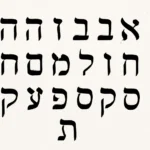
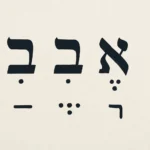
The Hebrew alphabet is abjad-like in that vowels are mostly indicated with diacritic marks called niqqum (vowel points). In everyday modern Hebrew orthography, niqqum are often omitted, and readers rely on context and knowledge of Hebrew morphology to infer vowels. A transliteration tool needs to handle two common scenarios:
Text with niqqum: when vowel points are present, the output often preserves or closely mirrors those vowels in the Latin form.
Text without niqqum: when vowels are absent, the tool typically uses a standard set of rules to insert vowels in the transliteration, resulting in a more readable phonetic rendering.
In addition to niqqum, Hebrew script often includes matres lectionis (such as ו, י, א) that can influence vowel quality. A thoughtful Hebrew transliterator accounts for these conventions to avoid misrepresenting a name or term. Finally, final forms of certain letters (sofit forms like final כ/ך, ם, ן, ף, ץ) should be handled correctly to ensure the output remains natural in Latin script.
Key concepts in Hebrew transliteration: standards, schemes, and preferences
A high-quality Hebrew transliteration tool exposes users to a variety of standards. Different communities prefer different schemes depending on their goals, whether academic rigor, publishing guidelines, or accessibility. Here is a concise overview of common standards and why you might choose them:
ISO 259-2 and related ISO 259-series conventions: a widely used international standard for the transliteration of Hebrew (and other scripts) into Latin characters. It aims for precision and machine readability, often employing diacritics to reflect vowel quality and consonantal distinctions.
ALA-LC romanization tables: designed for library cataloging and academic bibliographies in the humanities. ALA-LC is popular in library environments and can be preferred when you need compatibility with catalog systems and citations.
SBL transliteration system: commonly used in biblical studies and linguistics to render Hebrew and Aramaic terms in scholarly texts. It emphasizes consistency across scriptural references and linguistic analysis.
Academy of the Hebrew Language guidelines (for Modern Hebrew): these guidelines reflect contemporary usage and are often adopted in publishing, education, and media for everyday Hebrew transliteration.
BGN/PCGN and UNGEGN conventions: primarily used for place names and geopolitical terms in international contexts. If you’re transliterating to produce maps, travel guides, or government documents, these standards can be particularly helpful.
A free online transliterator for Hebrew should ideally expose these options to users, enabling them to select a preferred standard and to generate outputs that conform to the chosen convention. For learners and casual users, a sane default—often a simple, human-friendly form like «Shalom» or «Yerushalayim»—is convenient, while researchers and publishers may appreciate the availability of formal diacritics and standardized spellings.
What makes a free online Hebrew transliterator effective?
The best online Hebrew transliteration tools distinguish themselves through a combination of accuracy, usability, and flexibility. Here are the features that commonly define a high-quality free online tool:
Accurate mapping from Hebrew letters (including final forms) to Latin equivalents, with attention to context-sensitive letters such as shin (ש) and sin (שׁ) and the kaf/khaf distinction (כ/ך vs מ/ם, etc.).
Vowel handling options, including the ability to preserve niqqum when provided, or to supply a vowel-less transliteration suitable for everyday use.
Multiple transliteration schemes to accommodate ISO 259-2, ALA-LC, SBL, modern Hebrew conventions, and place-name conventions.
Bidirectional text support and robust handling of right-to-left (RTL) input and left-to-right (LTR) output, so that the interface remains intuitive and the results appear correctly in various contexts.
Input flexibility handling plain text, Unicode, and sometimes niqqum-bearing strings. Some tools also clean up inconsistent spacing or punctuation to maintain readability.
Export and sharing options such as copy-to-clipboard, downloadable files, or shareable links, which are essential for workflows in research, teaching, or publishing.
Privacy and data handling policies that clarify whether input material is stored, anonymized, or discarded after processing, which matters when transliterating personal names or sensitive content.
Accessibility considerations, including keyboard navigation, screen-reader compatibility, and clear labeling of options so that users with diverse needs can use the tool effectively.
How a Hebrew transliterator works under the hood
At a high level, a Hebrew transliterator follows a pipeline similar to many language processing tools:
Input capture: the user pastes or types Hebrew text. The system detects the directionality (RTL) and normalizes characters for consistent processing (Unicode normalization forms).
Option parsing: the user selects a transliteration scheme and preference for vowels. If niqqum is present, many tools preserve or map them to diacritics; if not, they generate a phonetic rendering based on the chosen scheme.
Character mapping: each Hebrew letter is mapped to its Latin counterpart according to the chosen standard. Special handling is applied to final forms and to letters with multiple readings (e.g., pe with or without dagesh, shin with dot vs sin).
Vowel handling: niqqum, vowel indicators like vav (v/o) and yod (i/ey), and matres lectionis are interpreted according to the schema. Some outputs insert diacritics to reflect original pronunciation; others provide a simplified vowel-less transliteration.
Orthographic adjustments: prefixes such as ha- (the definite article) are correctly attached, and hyphenation or spacing is applied per the chosen standard (for instance, Yerushalayim vs. Yerushalaim in some plain forms).
Output generation: the final Latin text is produced, optionally with diacritics, and presented to the user. The system often offers both a plain ASCII version and a diacritic-rich version for academic use.
In addition to rule-based mappings, many modern transliterators incorporate heuristics to handle ambiguities. For example, without niqqum, a word ending with the letters ת might be transliterated as -t or -th depending on context, and a tool may offer a best-guess option with a note about possible alternatives. Advanced tools also offer quality controls, such as highlighting uncertain vowels or offering alternate outputs for user review.
Practical use cases: who benefits from a free online Hebrew transliterator?
A versatile, accessible tool for Hebrew-to-Latin transliteration serves a broad spectrum of users. Here are common scenarios where such a tool is indispensable:
Academic research: linguists, philologists, and students frequently need to render Hebrew terms into a consistent Latin form for papers, bibliographies, and cross-linguistic comparisons. A robust transliterator helps maintain uniformity across chapters, appendices, and glossaries.
Genealogy and family history: genealogists and individual researchers often encounter Hebrew records, names, and places. A reliable transliteration helps in indexing, searching, and sharing family names with non-Hebrew speakers.
Religious and liturgical study: scholars of Judaism and biblical studies encounter Hebrew scriptures, liturgical phrases, and rabbinic terms. Transliteration allows readers to pronounce terms aloud and to connect transliterations to primary texts.
Publishing and editing: authors and editors preparing bilingual editions (Hebrew and Latin scripts) need consistency, especially for captions, glossaries, and footnotes. An online tool can be integrated into a workflow to speed up production.
Education and language learning: language learners benefit from a transliterator that offers both natural spellings and phonetic cues, aiding pronunciation and literacy development.
Localization and translation workflows: for maps, travel guides, or encyclopedias, transliterated place-names and terms must adhere to a standard so readers from multiple regions recognize them.
Concrete examples: demonstrating transliteration in practice
Here are representative Hebrew phrases and how they might appear when processed by a capable free online Hebrew transliterator:
שלום
Plain transliteration (no niqqum): Shalom
With standard academic diacritics (example, a hypothetical ISO-style rendering): Šālōm
Common modern form: Shalom
ירושלים
Plain transliteration: Yerushalayim
Diacritic-rich form (for scholarly work): Yərušālaim
Alternate common rendering: Yerushalayim
ישראל
Plain transliteration: Yisrael or Yisra’el
Diacritics-based form (for academic text): Yisrā’ēl
Place-name convention: Yisrael
תל אביב
Plain transliteration: Tel Aviv
Hyphenated scholarly form: Tel-Aviv
Alternative modern rendering: Tel-Aviv
הארץ
Plain transliteration: Ha-aretz
Diacritics-enabled scholarly form: Ha-ʾĀreṣ
Keep in mind that the exact representation will vary depending on the selected standard. If you are publishing material for a general audience, the plain, readable forms such as Shalom, Yerushalayim, and Tel Aviv are often most appropriate. If you are preparing scholarly work or bibliographic records, you may prefer a standard like ISO 259-2 or ALA-LC that encodes more precise vowel and consonant information.
Choosing the right transliteration standard for your project
Selecting the appropriate transliteration standard is not merely a matter of taste. It has practical implications for searchability, cross-language consistency, and the intended audience. Consider these guidelines when using a Hebrew transliterator online:
If you are preparing academic documents, choose a standard that aligns with the discipline’s conventions (for example, ISO 259-2 or ALA-LC for bibliographies, SBL for biblical studies).
If you are creating educational materials for Hebrew learners, you may want to provide both a plain transliteration and a diacritics-rich version so learners can map sounds to letters effectively.
If you are working on publishing projects with strict house styles, ensure the transliteration tool can export outputs that match the house style’s requirements or offer a customizable schema.
For place names and geographical material, consider standards favored by cartography and gazetteers (BGN/PCGN or UNGEGN) to improve compatibility with maps and international references.
When dealing with personal names, note that transliteration is not a neutral act. You may encounter family preferences, cultural expectations, or historical usages. A flexible tool that allows user-provided preferred spellings can be valuable.
How to use a free online Hebrew transliterator effectively
Here are practical steps to maximize the benefit of a free online Hebrew transliterator:
Paste or type the Hebrew text you wish to transliterate. If niqqum is present, decide whether you want to preserve it or render a diacritic-free version.
Pick a scheme that matches your goal (e.g., ISO 259-2 for technical accuracy, ALA-LC for library catalogs, or a practical modern-Hebrew rendering for everyday use).
Review the output. If the word is a proper name or a borrowed term, check whether the transliteration aligns with your preferred form or with your organization’s style guide.
Export or copy the result. Use the copy-to-clipboard feature for quick transfer, or download a file if your workflow requires batch processing.
Validate in context. For a multi-language document, test the transliterated strings in surrounding text to ensure readability and consistency.
Accessibility, privacy, and ethical considerations
A free online transliterator is a practical tool, but users should be mindful of privacy and data handling. If you are transliterating sensitive personal information, you should review the platform’s privacy policy and consider whether you want the data stored on the server or processed locally in your browser. Some services offer local processing options or guarantee that inputs are not stored after processing. When possible, choose tools that provide transparency about data retention, encryption, and access controls.
In addition to privacy, consider accessibility and inclusivity. An ideal online transliterator supports keyboard navigation, screen readers, and clear labeling for the various transliteration schemes. This ensures that language learners, researchers with disabilities, and non-native speakers can use the tool effectively.
Implementation considerations for developers and educators
If you are a developer or educator considering integrating a Hebrew transliteration capability into a website or learning platform, here are practical considerations:
Open standards: Prefer standards with widely accepted specifications (such as ISO 259-2 and ALA-LC) to ensure long-term interoperability.
Modularity: Build a modular transliteration component that can switch between schemes without altering core data structures. This makes it easier to adapt to evolving standards or local preferences.
Performance: For large texts (e.g., entire chapters or datasets), optimize the mapping engine to process streams efficiently and avoid UI lag.
Localization: Consider language packs and locale-aware formatting so transliterations render correctly in multilingual contexts.
Extensibility: Allow user-defined glossaries of preferred spellings for common names, places, or technical terms, so the transliterator can apply brand- or project-specific conventions.
No tool is perfect, and even a free online Hebrew transliterator may have limitations. Common challenges include:
Ambiguities in vowelless Hebrew words where multiple pronunciations are possible. Mitigation: offer multiple output options or provide a phonetic transcription alongside the primary transliteration.
Handling of proper names with user-specific pronunciations. Mitigation: allow user customization and preservation of preferred spellings.
Consistency across documents when switching between standards. Mitigation: establish a workflow that exports outputs in a single chosen standard for the entire project.
Dependence on online services for access. Mitigation: provide offline or client-side processing options when possible, or keep an export-ready model that does not require a constant connection.
Terminology recap: bolded highlights for quick reference
Throughout this article, you may notice bolded terms that capture the essence of what makes a Hebrew transliterator valuable. Here is a quick glossary for readers who want to anchor their understanding:
Hebrew transliterator: a tool converting Hebrew script to Latin script.
Transliteration vs transcription: letter-mapping versus phonetic rendering.
Final forms: sofit letter shapes at the end of words (e.g., ך, ם, ן, ף, ץ).
ISO 259-2, ALA-LC, SBL, Academy of the Hebrew Language: major transliteration standards.
RTL and LTR: text directionality concerns in Hebrew and Latin scripts.
Privacy policy and data handling: important considerations for online tools.
Concluding thoughts: the value of a free online Hebrew transliterator
A well-designed Hebrew transliterator online can be an indispensable companion for anyone working with Hebrew text in Latin script. By offering multiple transliteration schemes, robust handling of diacritics and final forms, and flexible export options—all within a free online tool—it lowers barriers to accurate, consistent representation across languages and disciplines.
Whether you are a student compiling notes, a researcher assembling a bibliographic entry, a publisher coordinating a bilingual edition, or a traveler encountering place names in Hebrew, a quality online transliteration tool is a practical asset. Remember to choose a scheme that aligns with your aims, review outputs for context-sensitive cases (such as personal names and geographical terms), and consider privacy and accessibility as you work. With these considerations in mind, you can rely on the Hebrew transliterator to produce clear, readable Latin renderings that respect linguistic standards while remaining user-friendly.